AI is changing the way software gets made — not by replacing developers, but by working beside them, line by line.
In these instructor-led courses, participants learn to code with AI copilots, auto-generate tests, flag bugs before they break production, and turn plain English into working code.
Online live training is delivered via interactive remote desktop, while onsite sessions in Ontario pair developers with hands-on labs inside real IDEs and version-controlled projects.
Onsite courses can be hosted in your own engineering space in Ontario, or held at a NobleProg training center designed for collaborative, tool-driven learning.
Also known as AI-Assisted Programming, AI-Integrated Development, AI-Augmented Software Development, AI-Enhanced Coding, or Intelligent Software Development, this training empowers teams to build faster — with confidence and clarity.
NobleProg – Your Local Training Provider
London - London City Centre
380 Wellington Street, London, Canada, N6A 5B5
The centre occupies the 6th floor of City Centre Building a conveniently-located corner complex in downtown London, Ontario.

West Toronto - Etobicoke
10 Four Seasons Place, Toronto, Canada, M9B 6H7

Etobicoke is a prestigious area located on the western fringe of Toronto, and is the cushion between Toronto and Mississauga. Easily accessible by public transportation (bus) and is 5 minutes from the local subway station.
Scarborough – 10 Milner Business Court
10 Milner Business Court, Scarborough, Canada, M1B 3C6

The Milner Court Centre occupies the third floor of a corner property. It is easily accessible by public transport, both by bus and the rapid transit system.
Oakville - Winston Park
2010 Winston Park Drive, Oakville, Canada, L6H 5R7

The Winston Park centre is located close to both the Queen Elizabeth Way and Ontario 403 giving easy access for Burlington and Hamilton to the west and Mississauga and Toronto to the East.
Barrie - 49 High Street
49 High Street, Barrie, Canada, L4N 5J4

Balance work and leisure from our office space at 49 High Street. Barrie has a bustling commercial heart and enjoys great connectivity – our central office space is just a few minutes’ drive from Highway 400
Maximise opportunities in this forward-thinking city, a knowledge center home to several tech giants. Our well-connected 180 Northfield Drive West centre is on the city's Corporate Campus near the prestigious University of Waterloo.
Kitchener - 22 Frederick Street
22 Frederick Street, Kitchener, canada, N2H 6M6
Prominent office space in downtown location
Establish your business in the heart of downtown Kitchener. Work alongside leading finance and insurance companies at our 22 Frederick Street offices on the corner of Frederick Street, giving you easy access to local amenities.
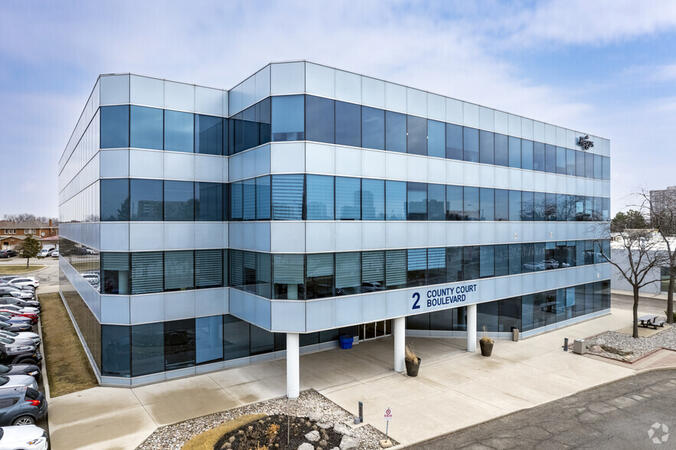
Brampton - 2 County Court
2 County Court Boulevard, Brampton, Canada, L6W 3W8

Look to the future with an office space at 2 County Court, a building with outstanding sustainability credentials. The third largest city in Greater Toronto enjoys great transport links, while Toronto’s international airport is under 10 miles away.
Richmond Hill - The Business Exchange
9225 Leslie Street, Richmond Hill, Canada, L4B 3H6

Place your business in the peaceful surroundings of Richmond Hill, home to leading global brands. Located in the northern suburbs, our The Business Exchange workspace is just a 30-minute drive from central Toronto and the International Airport.
Ottawa - Albert & Metcalfe
116 Albert Street, Ottawa, Canada, K1P 5G3

Across the street from the World Exchange Plaza. The Ottawa Shaw Centre and CF Rideau Centre shopping mall 10 minutes away.
Barrie-49 High Street
3rd floor, Dunlop Street West, Barrie, Canada, L4N 1A8

A Perfect Balance of Work and Leisure by Lake Simcoe
Combine productivity with relaxation in our office space at 49 High Street. Located in the vibrant commercial center of Barrie, this office offers excellent connectivity, with Highway 400 just a short drive away.
Work efficiently in a modern brick building featuring a glass-fronted entrance, beautifully designed workspaces, and curated artwork in every meeting room. After a productive day, enjoy the nearby restaurants or take a leisurely walk to Heritage Park by the waterfront for some fresh air and relaxation.
Toronto - Toronto Street
36 Toronto Street, Toronto, Canada, M5C 2C5

Steps away from Toronto's prestigious financial core. Fast link to Pearson International Airport - less than 30 minutes away.
Ottawa - 343 Preston
343 Preston Street, Ottawa, Canada, K1S 1N4

On the top floor of a distinctive office tower that's highly visible from Highway 417, you will find Regus 343 Preston Centre in Ottawa. Only a 10 minute drive from downtown Ottawa, a short stroll away from Downs Lake, and located near the lively intersection of Preston Gladstone in Little Italy.
Mississauga - Airways
5925 Airport Road, Mississauga, Canada, L4V 1W1
Airways is a beautiful center located at 5925 Airport Road, directly across from Toronto Pearson International Airport offering shuttle services. Adjacent to Highways 409 and 427, our center is easily accessible.
GitHub Copilot is an AI-powered code completion tool that helps accelerate development while improving quality and productivity. Combined with Artificial Intelligence applications in projects, infrastructure, and software, managers can leverage AI to optimize resource allocation, streamline workflows, and enhance decision-making.
This instructor-led, live training (online or onsite) is aimed at advanced-level managers who wish to deepen their knowledge of GitHub Copilot while also exploring practical AI applications in corporate environments, with examples relevant to large-scale projects and industries such as oil and gas.
By the end of this training, participants will be able to:
Apply advanced Copilot functionalities in large-scale corporate projects.
Integrate Copilot into multidisciplinary workflows for maximum efficiency.
Leverage AI tools to optimize project management, infrastructure, and software acquisition.
Implement AI-based strategies to improve planning, estimation, and time optimization.
Recognize practical AI applications in industry-specific scenarios such as oil and gas.
Format of the Course
Interactive lecture and discussion.
Hands-on exercises and case studies.
Live-lab demonstrations of AI tools and Copilot workflows.
Course Customization Options
To request a customized training for this course, please contact us to arrange.
Artificial Intelligence (AI) is a set of technologies that simulate human intelligence in machines and applications, enabling smarter and more adaptive software.
This instructor-led, live training (online or onsite) is aimed at intermediate-level developers who wish to build AI-powered applications using real-world tools and platforms.
By the end of this training, participants will be able to:
Understand core AI and machine learning concepts.
Develop AI features using Python and popular libraries.
Apply AI techniques to real software development projects.
Evaluate models and deploy intelligent services.
Format of the Course
Interactive lecture and discussion.
Lots of exercises and practice.
Hands-on implementation in a live-lab environment.
Course Customization Options
To request a customized training for this course, please contact us to arrange.
GitHub Copilot is an AI-powered coding assistant that helps automate development tasks, including DevOps operations such as writing YAML configurations, GitHub Actions, and deployment scripts.
This instructor-led, live training (online or onsite) is aimed at beginner-level to intermediate-level professionals who wish to use GitHub Copilot to streamline DevOps tasks, improve automation, and boost productivity.
By the end of this training, participants will be able to:
Use GitHub Copilot to assist with shell scripting, configuration, and CI/CD pipelines.
Leverage AI code completion in YAML files and GitHub Actions.
Accelerate testing, deployment, and automation workflows.
Apply Copilot responsibly with an understanding of AI limitations and best practices.
Format of the Course
Interactive lecture and discussion.
Lots of exercises and practice.
Hands-on implementation in a live-lab environment.
Course Customization Options
To request a customized training for this course, please contact us to arrange.
Huawei Ascend is a family of AI processors designed for high-performance inference and training.
This instructor-led, live training (online or onsite) is aimed at intermediate-level AI engineers and data scientists who wish to develop and optimize neural network models using Huawei’s Ascend platform and the CANN toolkit.
By the end of this training, participants will be able to:
Set up and configure the CANN development environment.
Develop AI applications using MindSpore and CloudMatrix workflows.
Optimize performance on Ascend NPUs using custom operators and tiling.
Deploy models to edge or cloud environments.
Format of the Course
Interactive lecture and discussion.
Hands-on use of Huawei Ascend and CANN toolkit in sample applications.
Guided exercises focused on model building, training, and deployment.
Course Customization Options
To request a customized training for this course based on your infrastructure or datasets, please contact us to arrange.
This instructor-led, live training in Ontario (online or onsite) is aimed at intermediate-level software professionals who wish to leverage AI and machine learning to improve efficiency and innovation in software development.
By the end of this training, participants will be able to:
Understand the role of AI and machine learning in automating software development tasks.
Implement AI tools to generate code, tests, and documentation.
Apply AI techniques for code optimization, quality assurance, and debugging.
Integrate AI into the DevOps and CI/CD pipelines for improved deployment strategies.
Address ethical considerations and challenges in AI-augmented software engineering.
This instructor-led, live training in Ontario (online or onsite) is aimed at intermediate-level to advanced-level participants who wish to optimize team workflows, enhance collaborative coding practices, and effectively manage Copilot usage in multi-developer environments.
By the end of this training, participants will be able to:
Set up GitHub Copilot for team environments.
Utilize Copilot to enhance collaborative coding practices.
Optimize team workflows using Copilot’s features.
Manage Copilot’s integration in multi-developer projects.
Maintain consistent code quality and standards across teams.
Leverage advanced Copilot features for team-specific needs.
Combine Copilot with other collaborative tools for efficiency.
This instructor-led, live training in Ontario (online or onsite) is aimed at intermediate-level QA engineers, developers, and team leads who wish to leverage GitHub Copilot for more efficient debugging, code quality enhancement, and streamlined code review.
By the end of this training, participants will be able to:
Set up GitHub Copilot for debugging and code review purposes.
Use Copilot to identify and resolve bugs efficiently.
Enhance code quality with AI-assisted suggestions.
Streamline code review processes with Copilot's capabilities.
Collaborate effectively using Copilot in team environments.
By the end of this training, participants will be able to:
Prompt Engineering for Software Development is a hands-on course designed to teach developers how to craft effective prompts that optimize the usefulness, precision, and safety of AI-generated outputs in the context of software engineering tasks.
This instructor-led, live training (online or onsite) is aimed at intermediate-level developers who wish to integrate prompt engineering techniques into their use of AI coding assistants, code analyzers, and intelligent automation tools.
Create precise prompts for code generation, review, and optimization tasks.
Use prompt chaining and refinement to improve AI responses in iterative workflows.
Generate structured outputs such as test cases, SQL queries, and documentation from minimal input.
Mitigate hallucination and improve control over LLM behavior in technical environments.
Interactive lecture and discussion.
Lots of exercises and practice.
Hands-on implementation in a live-lab environment.
To request a customized training for this course, please contact us to arrange.
This instructor-led, live training in Ontario (online or onsite) is aimed at intermediate-level front-end developers who wish to use GitHub Copilot to automate repetitive coding tasks, improve UI/UX design, and streamline front-end workflows.
By the end of this training, participants will be able to:
Set up GitHub Copilot for front-end development projects.
Leverage Copilot to generate HTML, CSS, and JavaScript code efficiently.
Improve UI/UX design processes using AI-generated code suggestions.
Enhance front-end workflows with practical Copilot integration strategies.
Troubleshoot and debug front-end code using Copilot assistance.
Responsible AI in Software Development is a foundational course that addresses the ethical, legal, and governance considerations when using AI tools in the software development process. The course emphasizes transparency, fairness, intellectual property concerns, and safe deployment of AI-generated code.
This instructor-led, live training (online or onsite) is aimed at beginner-level technical and non-technical professionals who wish to ensure ethical, compliant, and risk-aware use of AI in their software projects.
By the end of this training, participants will be able to:
Identify and mitigate ethical and legal risks associated with AI-assisted development.
Understand bias in AI-generated code and how to evaluate fairness.
Manage software licenses and attribution related to AI-generated content.
Establish governance, policy, and compliance frameworks for AI use in development teams.
Format of the Course
Interactive lecture and discussion.
Lots of exercises and practice.
Hands-on implementation in a live-lab environment.
Course Customization Options
To request a customized training for this course, please contact us to arrange.
AI for Software Requirements and User Story Generation is a practical course focused on using generative AI to transform stakeholder input into structured requirements, epics, user stories, and acceptance criteria suitable for Agile development workflows.
This instructor-led, live training (online or onsite) is aimed at beginner-level product and project professionals who wish to use tools like ChatGPT or Claude to improve clarity, speed, and traceability in requirement gathering and refinement.
By the end of this training, participants will be able to:
Use AI prompts to gather and refine business requirements.
Convert feature requests into well-structured user stories and epics.
Generate acceptance criteria, edge cases, and definitions of done with AI assistance.
Collaborate with development teams using AI-structured documentation.
Format of the Course
Interactive lecture and discussion.
Lots of exercises and practice.
Hands-on implementation in a live-lab environment.
Course Customization Options
To request a customized training for this course, please contact us to arrange.
Cursor is an AI-powered development environment that enhances productivity and reliability across data and machine learning workflows through intelligent code generation, context-aware suggestions, and streamlined documentation.
This instructor-led, live training (online or onsite) is aimed at intermediate-level data and ML professionals who wish to integrate Cursor into their daily workflows for faster prototyping, scalable pipeline development, and improved model operations.
After completing this training, participants will be able to:
Use Cursor to accelerate notebook development and code exploration.
Generate, refactor, and document ETL and feature engineering pipelines.
Leverage AI-assisted code for model training, tuning, and evaluation.
Enhance reproducibility, collaboration, and operational consistency in ML workflows.
Format of the Course
Interactive lectures and demonstrations.
Practical, hands-on exercises in live coding environments.
Case studies integrating Cursor with ML pipelines and model ops tools.
Course Customization Options
This training can be tailored to specific frameworks such as TensorFlow, PyTorch, or scikit-learn, or to organizational MLOps platforms.
This instructor-led, live training in Ontario (online or onsite) is aimed at beginner-level to intermediate-level Python developers who wish to leverage GitHub Copilot for Python-specific tasks, debugging, and implementing machine learning workflows.
By the end of this training, participants will be able to:
Set up and configure GitHub Copilot for Python development.
Leverage Copilot to write efficient Python code.
Debug Python applications using AI-generated suggestions.
Automate repetitive coding tasks and improve workflow efficiency.
Utilize Copilot for implementing machine learning projects in Python.
Graphite is a developer productivity and code review platform that optimizes pull request workflows, improves team collaboration, and integrates with tools such as GitHub and AI-based code review assistants.
This instructor-led, live training (online or onsite) is aimed at intermediate-level software engineering teams who wish to streamline their development workflows, enhance review efficiency, and implement Graphite effectively within enterprise DevOps pipelines.
By the end of this training, participants will be able to:
Deploy and configure Graphite for enterprise-scale development environments.
Automate pull request management and improve code review throughput.
Integrate Graphite with GitHub, CI/CD systems, and AI assistants such as OpenAI, Deepseek, LlaMA, Qwen, and Mistral Small.
Measure developer productivity using Graphite analytics and dashboards.
Format of the Course
Interactive lecture and discussion.
Lots of exercises and practice.
Hands-on implementation in a live-lab environment.
Course Customization Options
To request a customized training for this course, please contact us to arrange.
Cursor is an advanced AI-powered development environment that allows engineers to extend, fine-tune, and customize its coding intelligence for specialized use cases and enterprise workflows.
This instructor-led, live training (online or onsite) is aimed at advanced-level developers and AI engineers who wish to design tailored prompt systems, fine-tune model behavior, and build custom extensions for internal development automation.
By the conclusion of this training, participants will be able to:
Design and test advanced prompt templates for precise AI behavior.
Connect Cursor to internal APIs and knowledge bases for context-aware code generation.
Develop fine-tuned or domain-adapted AI models for specialized tasks.
Build and deploy custom tools or adapters that extend Cursor’s functionality securely.
Format of the Course
Technical presentations and guided demonstrations.
Hands-on development and prompt optimization labs.
Practical projects integrating Cursor with real-world enterprise systems.
Course Customization Options
This course can be customized to align with specific internal architectures, AI frameworks, or security compliance requirements.
This instructor-led, live training in Ontario (online or onsite) is aimed at advanced-level participants who wish to customize GitHub Copilot for team projects, utilize its advanced features, and integrate it seamlessly into CI/CD pipelines for enhanced collaboration and productivity.
By the end of this training, participants will be able to:
Customize GitHub Copilot for specific project needs and team workflows.
Leverage advanced features of Copilot for complex coding tasks.
Integrate GitHub Copilot into CI/CD pipelines and collaborative environments.
Optimize team collaboration using AI-powered tools.
Manage and troubleshoot Copilot settings and permissions effectively.
Generative AI for Front-End Development explores how large language models and AI-powered tools can accelerate front-end development through prompt-based code generation, layout prototyping, and UI optimization.
This instructor-led, live training (online or onsite) is aimed at beginner-level to intermediate-level front-end professionals who wish to use generative AI to build and iterate user interfaces more quickly and creatively.
By the end of this training, participants will be able to:
Use AI tools to generate HTML, CSS, and JavaScript from natural language prompts.
Create and refine UI components and layouts using generative models.
Prototype responsive web designs rapidly without writing all code from scratch.
Optimize front-end code using AI suggestions and automation workflows.
Format of the Course
Interactive lecture and discussion.
Lots of exercises and practice.
Hands-on implementation in a live-lab environment.
Course Customization Options
To request a customized training for this course, please contact us to arrange.
This instructor-led, live training in Ontario (online or onsite) is aimed at developers ranging from novices to experts who wish to leverage AI for code generation with Tabnine.
By the end of this training, participants will be able to:
Understand the basics of AI-powered code generation.
Install and configure Tabnine in their development environment.
Utilize Tabnine for efficient code completion and error correction.
Create and train custom AI models with Tabnine for specialized tasks.
Vibe coding is an emerging paradigm where developers collaborate with large language models to generate, refine, and optimize code through natural language interactions.
This instructor-led, live training (online or onsite) is aimed at intermediate-level developers and technical leads who wish to master the use of AI coding assistants and open-source LLMs to improve productivity, creativity, and workflow automation.
By the end of this training, participants will be able to:
Understand the principles and philosophy of vibe coding and its impact on software development.
Implement LLM-assisted coding environments using tools such as Replit, DeepSeek, LlaMA, Qwen, Mistral, and GitHub Copilot.
Design and execute prompt engineering strategies for effective AI collaboration.
Integrate vibe coding workflows into enterprise CI/CD pipelines and governance frameworks.
Format of the Course
Interactive lecture and discussion.
Lots of exercises and practice.
Hands-on implementation in a live-lab environment.
Course Customization Options
To request a customized training for this course, please contact us to arrange.
AI-Augmented Test Generation and Quality Engineering explores how artificial intelligence tools and large language models (LLMs) can improve test coverage, speed up test creation, and enhance quality assurance processes.
This instructor-led, live training (online or onsite) is aimed at intermediate-level QA professionals who wish to automate and enhance their testing strategies using AI-driven tools and practices.
By the end of this training, participants will be able to:
Generate unit, integration, and UI tests using AI tools and prompts.
Use LLMs for exploratory testing, edge-case discovery, and regression analysis.
Cluster and prioritize test failures and anomalies using AI-assisted triage.
Integrate AI-based testing into CI/CD pipelines to improve release confidence.
Format of the Course
Interactive lecture and discussion.
Lots of exercises and practice.
Hands-on implementation in a live-lab environment.
Course Customization Options
To request a customized training for this course, please contact us to arrange.
Cursor is an AI-powered development environment that enhances team collaboration, automates code reviews, and integrates seamlessly into modern CI/CD workflows.
This instructor-led, live training (online or onsite) is aimed at intermediate-level technical professionals who wish to integrate Cursor into their team environments to improve collaboration, streamline reviews, and maintain quality across automated pipelines.
Upon completing this training, participants will be able to:
Set up and manage team environments in Cursor for collaborative development.
Leverage AI tools for automated code reviews, pull request generation, and merge validation.
Implement code governance, review policies, and security guardrails using Cursor’s capabilities.
Integrate Cursor with CI/CD systems to ensure continuous delivery and consistent quality standards.
Format of the Course
Instructor-led presentations and team-based discussions.
Hands-on labs using real-world team collaboration scenarios.
Live integration exercises with CI/CD and version control tools.
Course Customization Options
The course can be adapted to specific CI/CD platforms, repository tools, or enterprise security requirements.
This instructor-led, live training in Ontario (online or onsite) is aimed at beginner-level to intermediate-level programmers and developers who wish to leverage DeepSeek Coder to enhance coding efficiency and productivity.
By the end of this training, participants will be able to:
Understand the capabilities and limitations of DeepSeek Coder.
Generate high-quality code snippets using AI assistance.
Utilize DeepSeek Coder for debugging and optimizing code.
Automate repetitive programming tasks using AI tools.
This instructor-led, live training in Ontario (online or onsite) is aimed at intermediate-level participants who wish to leverage GitHub Copilot to handle advanced coding use cases, improve productivity, and integrate Copilot into their development workflows.
By the end of this training, participants will be able to:
Optimize their use of GitHub Copilot for advanced coding tasks.
Write more efficient, error-free, and maintainable code with Copilot suggestions.
Integrate GitHub Copilot into their preferred IDEs and workflows.
Utilize Copilot for debugging and code refactoring.
Understand the limitations and ethical considerations of using AI-powered coding tools.
This instructor-led, live training in Ontario (online or onsite) is aimed at advanced-level developers and team leads who wish to master advanced features of Tabnine.
By the end of this training, participants will be able to:
Implement Tabnine in complex software projects.
Customize and train Tabnine's AI models for specific use cases.
Integrate Tabnine into team workflows and development pipelines.
Enhance code quality and accelerate development cycles using Tabnine's insights.
This instructor-led, live training in Ontario (online or onsite) is aimed at beginner-level to intermediate-level software developers who wish to integrate AI coding assistants into their development workflow.
By the end of this training, participants will be able to:
Understand the role and capabilities of AI coding assistants in software development.
Utilize various AI coding assistant tools to automate routine coding tasks.
Integrate AI coding assistants into their software development lifecycle.
Enhance their productivity and focus on more complex and creative programming tasks.
Address ethical considerations and responsible use of AI in software development.
Devstral is an open-source framework designed for building and running coding agents that can interact with codebases, developer tools, and APIs to enhance engineering productivity.
This instructor-led, live training (online or onsite) is aimed at intermediate-level to advanced-level ML engineers, developer-tooling teams, and SREs who wish to design, implement, and optimize coding agents using Devstral.
By the end of this training, participants will be able to:
Set up and configure Devstral for coding agent development.
Design agentic workflows for codebase exploration and modification.
Integrate coding agents with developer tools and APIs.
Implement best practices for secure and efficient agent deployment.
Format of the Course
Interactive lecture and discussion.
Lots of exercises and practice.
Hands-on implementation in a live-lab environment.
Course Customization Options
To request a customized training for this course, please contact us to arrange.
Cursor is an AI-powered code editor designed to enhance developer productivity through intelligent code completions, contextual edits, and adaptive assistance.
This instructor-led, live training (online or onsite) is aimed at beginner-level developers and engineering teams who wish to streamline their coding workflow and safely leverage AI suggestions for improved efficiency.
Upon completion of this training, participants will be able to:
Install and configure Cursor for optimal use in development projects.
Understand and apply AI-assisted code completion, in-editor chat, and refactoring tools.
Evaluate, accept, or modify AI-generated code suggestions effectively and securely.
Adopt best practices for team onboarding, collaboration, and version control integration.
Format of the Course
Interactive lecture and discussion.
Hands-on demonstrations and guided exercises.
Real-world coding challenges and lab practice using Cursor.
Course Customization Options
This course can be tailored to specific programming languages or frameworks used by your team.
This instructor-led, live training in Ontario (online or onsite) is aimed at beginner-level developers who wish to understand GitHub Copilot's capabilities, set it up, and use it effectively to enhance their coding experience.
By the end of this training, participants will be able to:
Understand what GitHub Copilot is and how it works.
Set up GitHub Copilot with a supported code editor.
Use GitHub Copilot to write, refactor, and debug code faster.
Leverage Copilot to explore coding techniques and solutions.
Apply best practices for integrating GitHub Copilot into daily workflows.
LLMs for Code Understanding, Refactoring, and Documentation is a technical course focused on applying large language models (LLMs) to improve code quality, reduce technical debt, and automate documentation tasks across software teams.
This instructor-led, live training (online or onsite) is aimed at intermediate-level to advanced-level software professionals who wish to use LLMs such as GPT to analyze, refactor, and document complex or legacy codebases more effectively.
By the end of this training, participants will be able to:
Use LLMs to explain code, dependencies, and logic in unfamiliar repositories.
Identify and refactor anti-patterns and improve code readability.
Automatically generate and maintain in-line comments, README files, and API documentation.
Integrate LLM-driven insights into existing CI/CD and review workflows.
Format of the Course
Interactive lecture and discussion.
Lots of exercises and practice.
Hands-on implementation in a live-lab environment.
Course Customization Options
To request a customized training for this course, please contact us to arrange.
This instructor-led, live training in Ontario (online or onsite) is aimed at intermediate-level Python developers and data scientists who wish to boost their productivity with the help of Tabnine.
By the end of this training, participants will be able to:
Install and configure Tabnine in their Python development environment.
Use Tabnine's autocomplete features to write Python code more efficiently.
Customize Tabnine's behavior to fit their coding style and project needs.
Understand how Tabnine's AI model works specifically with Python code.
This instructor-led, live training in Ontario (online or onsite) is aimed at beginner-level participants who wish to understand AI coding assistants, their capabilities, how they can enhance the development process, and the ethical considerations surrounding their use.
By the end of this training, participants will be able to:
Understand the purpose and capabilities of AI coding assistants.
Identify different AI coding assistant tools and their features.
Utilize AI coding assistants for basic coding tasks.
Address basic ethical considerations and responsible use of AI in development.
AI-Driven Software Development Lifecycle (SDLC) is a practical course that explores how artificial intelligence can enhance each phase of the software development process. From automating requirement analysis to intelligent test generation and deployment optimization, participants will learn how to integrate AI tools and techniques across the full lifecycle.
This instructor-led, live training (online or onsite) is aimed at intermediate-level software leaders who wish to modernize their SDLC with AI-assisted workflows and tools.
By the end of this training, participants will be able to:
Leverage AI for converting business input into structured requirements and user stories.
Use LLMs to improve code documentation, review, and refactoring.
Automate test case generation and coverage analysis using AI tools.
Apply AI-driven monitoring and deployment decision-making in CI/CD pipelines.
Format of the Course
Interactive lecture and discussion.
Lots of exercises and practice.
Hands-on implementation in a live-lab environment.
Course Customization Options
To request a customized training for this course, please contact us to arrange.
This instructor-led, live training (online or onsite) is aimed at intermediate-level software developers who wish to boost productivity and code quality using AI-assisted coding with Cursor.
By the end of this training, participants will be able to:
Install and configure Cursor for AI-assisted software development.
Integrate Cursor with Git repositories and development workflows.
Use natural language to generate, debug, and optimize code.
Leverage AI capabilities for refactoring, documentation, and testing.
This instructor-led, live training in Ontario (online or onsite) is aimed at beginner-level to intermediate-level developers who wish to learn how to utilize the capabilities of GitHub Copilot effectively within modern development workflows.
This instructor-led, live training in Ontario (online or onsite) is aimed at beginner-level developers who wish to increase their coding efficiency with the help of Tabnine.
By the end of this training, participants will be able to:
Install and set up Tabnine in their preferred IDE.
Utilize Tabnine's autocomplete features to speed up coding.
Customize Tabnine's settings for optimal assistance.
Understand how Tabnine's AI learns from their code to provide better suggestions.
This immersive, one-day workshop that empowers software teams to integrate cutting-edge AI tools throughout the Software Development Lifecycle (SDLC). Structured as an interactive game with progressive “levels,” this experience blends technical skill-building, creativity, and collaboration.
Participants will tackle real-world challenges across all stages of the SDLC — from requirement gathering and design to coding, testing, deployment, and monitoring — using AI-powered tools like ChatGPT, GitHub Copilot, and ML-based log analysis systems.
Designed for modern development environments, this workshop fosters AI fluency, team synergy, and a deep understanding of how to augment software delivery pipelines with generative AI and machine learning capabilities.
Read more...
Last Updated:
Testimonials (2)
The way you use the copilot, more rule more close to what you need.
Carey Fan - Logitech
Course - Introduction to AI Coding Assistants
Lecturer's knowledge in advanced usage of copilot & Sufficient and efficient practical session
Online AI for Software Development training in Ontario, AI-Augmented Software Development training courses in Ontario, Weekend AI for Software Development courses in Ontario, Evening AI-Assisted Programming training in Ontario, Intelligent Software Development instructor-led in Ontario, Weekend AI-Enhanced Coding training in Ontario, AI-Augmented Software Development on-site in Ontario, Evening AI-Augmented Software Development courses in Ontario, AI-Augmented Software Development trainer in Ontario, AI for Software Development instructor-led in Ontario, AI-Assisted Programming one on one training in Ontario, AI-Integrated Development private courses in Ontario, Online AI-Enhanced Coding training in Ontario, AI-Enhanced Coding instructor in Ontario, AI-Augmented Software Development coaching in Ontario, AI-Integrated Development boot camp in Ontario, AI-Enhanced Coding classes in Ontario