Online or onsite, instructor-led live Productivity training courses demonstrate how to get more structure and productivity in life and with work.
Productivity training is available as "online live training" or "onsite live training". Ontario onsite live Productivity trainings can be carried out locally on customer premises or in NobleProg corporate training centers.
NobleProg -- Your Local Training Provider
London - London City Centre
380 Wellington Street, London, Canada, N6A 5B5
The centre occupies the 6th floor of City Centre Building a conveniently-located corner complex in downtown London, Ontario.
West Toronto - Etobicoke
10 Four Seasons Place, Toronto, Canada, M9B 6H7
Etobicoke is a prestigious area located on the western fringe of Toronto, and is the cushion between Toronto and Mississauga. Easily accessible by public transportation (bus) and is 5 minutes from the local subway station.
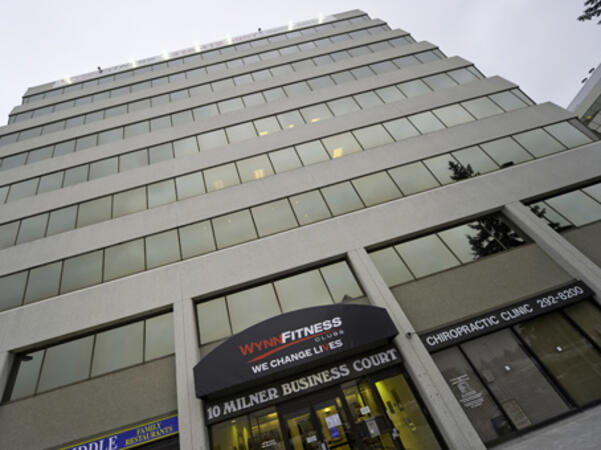
Scarborough – 10 Milner Business Court
10 Milner Business Court, Scarborough, Canada, M1B 3C6
The Milner Court Centre occupies the third floor of a corner property. It is easily accessible by public transport, both by bus and the rapid transit system.
Oakville - Winston Park
2010 Winston Park Drive, Oakville, Canada, L6H 5R7
The Winston Park centre is located close to both the Queen Elizabeth Way and Ontario 403 giving easy access for Burlington and Hamilton to the west and Mississauga and Toronto to the East.
Barrie - 49 High Street
49 High Street, Barrie, Canada, L4N 5J4
Balance work and leisure from our office space at 49 High Street. Barrie has a bustling commercial heart and enjoys great connectivity – our central office space is just a few minutes’ drive from Highway 400
Maximise opportunities in this forward-thinking city, a knowledge center home to several tech giants. Our well-connected 180 Northfield Drive West centre is on the city's Corporate Campus near the prestigious University of Waterloo.
Kitchener - 22 Frederick Street
22 Frederick Street, Kitchener, canada, N2H 6M6
Prominent office space in downtown location
Establish your business in the heart of downtown Kitchener. Work alongside leading finance and insurance companies at our 22 Frederick Street offices on the corner of Frederick Street, giving you easy access to local amenities.
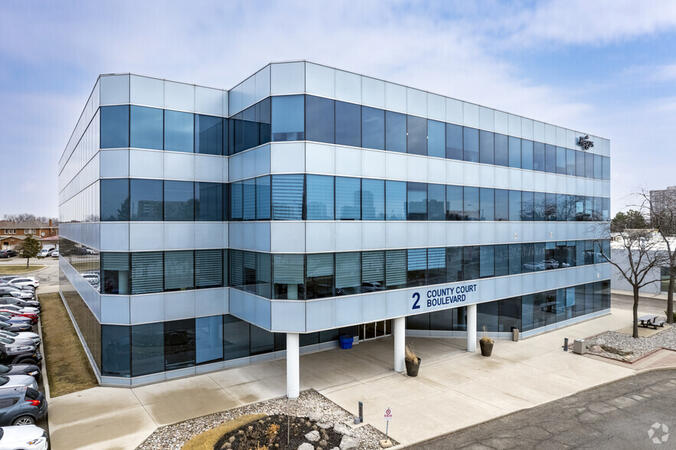
Brampton - 2 County Court
2 County Court Boulevard, Brampton, Canada, L6W 3W8
Look to the future with an office space at 2 County Court, a building with outstanding sustainability credentials. The third largest city in Greater Toronto enjoys great transport links, while Toronto’s international airport is under 10 miles away.
Richmond Hill - The Business Exchange
9225 Leslie Street, Richmond Hill, Canada, L4B 3H6
Place your business in the peaceful surroundings of Richmond Hill, home to leading global brands. Located in the northern suburbs, our The Business Exchange workspace is just a 30-minute drive from central Toronto and the International Airport.
Ottawa - Albert & Metcalfe
116 Albert Street, Ottawa, Canada, K1P 5G3
Across the street from the World Exchange Plaza. The Ottawa Shaw Centre and CF Rideau Centre shopping mall 10 minutes away.
Barrie-49 High Street
3rd floor, Dunlop Street West, Barrie, Canada, L4N 1A8
A Perfect Balance of Work and Leisure by Lake Simcoe
Combine productivity with relaxation in our office space at 49 High Street. Located in the vibrant commercial center of Barrie, this office offers excellent connectivity, with Highway 400 just a short drive away.
Work efficiently in a modern brick building featuring a glass-fronted entrance, beautifully designed workspaces, and curated artwork in every meeting room. After a productive day, enjoy the nearby restaurants or take a leisurely walk to Heritage Park by the waterfront for some fresh air and relaxation.
Toronto - Toronto Street
36 Toronto Street, Toronto, Canada, M5C 2C5
Steps away from Toronto's prestigious financial core. Fast link to Pearson International Airport - less than 30 minutes away.
Ottawa - 343 Preston
343 Preston Street, Ottawa, Canada, K1S 1N4
On the top floor of a distinctive office tower that's highly visible from Highway 417, you will find Regus 343 Preston Centre in Ottawa. Only a 10 minute drive from downtown Ottawa, a short stroll away from Downs Lake, and located near the lively intersection of Preston Gladstone in Little Italy.
Mississauga - Airways
5925 Airport Road, Mississauga, Canada, L4V 1W1
Airways is a beautiful center located at 5925 Airport Road, directly across from Toronto Pearson International Airport offering shuttle services. Adjacent to Highways 409 and 427, our center is easily accessible.
A company hackathon lets teams from departments and IT try AI on their own problems and take working solutions with them. The format combines two discovery sessions beforehand with tool onboarding, a 24-hour sprint and a pitch to the management. Each team ends with a working solution and a usage plan for the following week.
This instructor-led, live training in Ontario is aimed at: Mixed teams from departments and IT who want to try AI on their own problems and take working solutions with them.
By the end of this training, participants will be able to:
Formulate problems and bottlenecks in the own area as solvable challenges
Know eight to ten AI tools and select one for a task
Build a working solution in small teams
Evaluate solutions by benefit and feasibility
Present the result in a pitch
Define a plan for use in the following week
Format of the Course
Duration: 2 days on site (including a 24-hour sprint) plus two discovery sessions beforehand
Interactive training with a trainer, discussion and hands-on exercises on the participants' own use cases
Outcome, Beforehand: Challenges, tool selection and success criteria are defined.
Outcome, Day 1: Each team has a sharpened challenge and a first working version.
Outcome, Day 2: Each team has a working solution, a presented pitch and a plan for use from the following week.
Course Customization Options
To request a customized training for this course, please contact us to arrange.
This hands-on workshop is tailored to the tasks of one team and uses the AI tool already approved in the company. It covers prompting techniques, lasting setups such as projects and assistants, working with files and safe use. The group leaves with a shared prompt collection and solved tasks from its own daily work.
This instructor-led, live training in Ontario is aimed at: Teams from case processing, specialist departments, research or IT support who already have first experience with AI and want better results for their own tasks.
By the end of this training, participants will be able to:
Understand what happens in the model when prompting and why models invent details
Write instructions with role, task, context, examples, format and limits
Break down large tasks and improve results in a targeted way
Use instructions, memory, projects and own assistants on a lasting basis
Work with files, scans, tables and research assignments
Verify results, recalculate figures and protect data
Secure own templates for the group and reuse them
Format of the Course
Duration: 1 day (7 hours) or 2 sessions of 4 hours per group, online or on site, up to 15 participants
Interactive training with a trainer, discussion and hands-on exercises on the participants' own use cases
Outcome, Block 1: Each participant has at least one verified template for their own work.
Outcome, Block 2: Each group has a shared prompt collection, a shared project and two solved tasks from real daily work.
Course Customization Options
To request a customized training for this course, please contact us to arrange.
Browser agents can read web pages, compare vendors and fill in forms on behalf of the user. This one-day course covers ChatGPT Agent and Atlas, Claude in Chrome and Perplexity Comet, suitable tasks and the risks, such as hidden instructions on web pages. Participants hand over two tasks, verify the results and define rules for the team.
This instructor-led, live training in Ontario is aimed at: Specialist users, assistants and researchers who want to hand over recurring work on web pages and in web applications to AI agents.
By the end of this training, participants will be able to:
Understand how browser agents read pages, click and fill in forms
Classify ChatGPT Agent and Atlas, Claude in Chrome and Perplexity Comet
Select suitable tasks such as research, comparisons and form work
Formulate assignments with goal, limits and approval points
Recognize and limit risks such as hidden instructions on web pages
Define rules for use in the team
Format of the Course
Duration: 1 day (7 hours)
Interactive training with a trainer, discussion and hands-on exercises on the participants' own use cases
Outcome, Day 1: Each participant has handed over two tasks to a browser agent, verified the results and defined rules for use in the team.
Course Customization Options
To request a customized training for this course, please contact us to arrange.
Project work in Microsoft 365 spreads across Teams, Planner, Lists and SharePoint, and much of the effort goes into status reports and follow-up. This one-day course shows how Copilot and agents can support status reporting, meetings, tasks and risk detection. Participants build a project knowledge agent and a mock-up for a real project problem.
This instructor-led, live training in Ontario is aimed at: Project managers, PMO staff, team assistants and project members who work in Microsoft 365 with Teams, Planner, Lists and SharePoint.
By the end of this training, participants will be able to:
Classify the agents in Microsoft 365 for project work
Create status reports from emails, meetings and lists with Copilot
Use agents in Teams and Planner for meetings and tasks
Build a project knowledge agent with documents, lessons learned and contacts
Make risks and delays visible earlier
Build a solution for a real project problem as a mock-up and present it
Format of the Course
Duration: 1 day (7 hours)
Interactive training with a trainer, discussion and hands-on exercises on the participants' own use cases
Outcome, Day 1: Each participant has a status report, a tested project knowledge agent and a presented mock-up for a real project problem.
Course Customization Options
To request a customized training for this course, please contact us to arrange.
Lovable builds web applications from natural language prompts, which makes it useful for internal tools, forms, dashboards and prototypes. This one-day course covers the interface, prompting, database, login and publishing, and ends with a published app and a started own use case. No programming skills are required.
The trainer, Tim Jamboula, is an official Lovable Ambassador and Cursor Ambassador.
This instructor-led, live training in Ontario is aimed at: Specialist users, project leads, founders and teams who want to build internal tools, forms, dashboards or prototypes themselves.
By the end of this training, participants will be able to:
Understand how AI-assisted building works and when Lovable is the right tool
Operate the interface confidently, including Plan, Build and Visual Edits
Prompt according to five principles and use knowledge and skills
Set up database, login, storage and connectors
Publish an app safely and use the security scan
Start an own use case and know the next steps
Format of the Course
Duration: 1 day (7 hours)
Interactive training with a trainer, discussion and hands-on exercises on the participants' own use cases
Outcome, Day 1: Each participant has a published app with a database, login and live URL, and a started own use case.
Course Customization Options
To request a customized training for this course, please contact us to arrange.
Clickable prototypes created in hours can replace static mockups in discovery and stakeholder reviews. This one-day course shows product managers and designers how to build variants, map a design system, run live reviews and prepare the handover to development. Participants finish with a prototype for a feature of their own.
The trainer, Tim Jamboula, is an official Lovable Ambassador and Cursor Ambassador.
This instructor-led, live training in Ontario is aimed at: Product managers, product owners, UX, UI and service designers, and discovery teams.
By the end of this training, participants will be able to:
Master the path from briefing to clickable prototype in a single session
Build several variants in parallel and refine them with user feedback
Map a design system, components and brand rules in Lovable
Run stakeholder reviews with working prototypes and live changes
Decide when to hand over to development and prepare the handover
Format of the Course
Duration: 1 day (7 hours)
Interactive training with a trainer, discussion and hands-on exercises on the participants' own use cases
Outcome, Day 1: Each participant has a clickable prototype for an own feature, a stored design system and a handover document for development.
Course Customization Options
To request a customized training for this course, please contact us to arrange.
This two-day course takes a team from a short briefing to a tested, published first version. It covers prototypes, data and roles, live iteration with stakeholders, testing with users, security, publishing and the handover to developers. Participants work on their own use case throughout.
The trainer, Tim Jamboula, is an official Lovable Ambassador and Cursor Ambassador.
This instructor-led, live training in Ontario is aimed at: Product teams, innovation managers, founders and departments who want to turn an idea into a tested prototype and a usable first version.
By the end of this training, participants will be able to:
Build a clickable prototype from a short briefing
Iterate prototypes live with stakeholders
Set up data, roles, login and integrations
Test with real users and implement feedback
Prepare security, publishing and operation of a first version
Plan the handover to a developer team
Format of the Course
Duration: 2 days (7 hours each), 6 to 12 participants
Interactive training with a trainer, discussion and hands-on exercises on the participants' own use cases
Outcome, Day 1: Each participant has a prototype with a database and login that has been improved in a simulated stakeholder session.
Outcome, Day 2: Each participant has a published, tested first version of their use case and a handover document.
Course Customization Options
To request a customized training for this course, please contact us to arrange.
Microsoft 365 Copilot is built into Outlook, Teams, Word, Excel and PowerPoint and works with the data that users already have access to. This course shows how to prompt effectively, verify results and use Notebooks, Pages and agents. Participants finish with a first FAQ agent on a SharePoint knowledge base.
This instructor-led, live training in Ontario is aimed at: Employees and departments with Microsoft 365 Copilot, from beginners to advanced users.
By the end of this training, participants will be able to:
Distinguish Copilot Chat and the Copilots in Outlook, Teams, Word, Excel and PowerPoint
Understand which data Copilot accesses and how permissions apply
Prepare emails, meetings, reports and presentations with Copilot
Analyze Excel data and verify the results
Prompt effectively and respond when the first answer does not hold up
Use Notebooks, Pages and the Researcher and Analyst agents
Build a first simple agent on a SharePoint knowledge base
Format of the Course
Duration: 2 days (7 hours each), also available as a learning journey in 2-hour sessions
Interactive training with a trainer, discussion and hands-on exercises on the participants' own use cases
Outcome, Day 1: Each participant has implemented at least one use case in the apps and has two saved prompts for their own work.
Outcome, Day 2: Each participant has a notebook, a verified Researcher result and a tested FAQ agent. Each group has presented a solution idea with a mock-up.
Course Customization Options
To request a customized training for this course, please contact us to arrange.
Reliable research needs more than a quick answer: sources have to be selected, checked and documented. This course covers Perplexity Spaces, deep research, Labs and the Comet browser, with a strong focus on source checking. Participants leave with a Space, a verified piece of research and a template for recurring assignments.
This instructor-led, live training in Ontario is aimed at: Employees who research regularly, for example in purchasing, project work, knowledge management, assistance and specialist departments.
By the end of this training, participants will be able to:
Understand how Perplexity searches, selects sources and forms answers
Formulate research assignments with question, sources, exclusions and format
Check sources systematically and recognize errors in citations
Set up Spaces with instructions and files for topics and teams
Use deep research and Labs for reports and tables
Use the Comet browser safely for research and tasks on web pages
Format of the Course
Duration: 1 day (7 hours)
Interactive training with a trainer, discussion and hands-on exercises on the participants' own use cases
Outcome, Day 1: Each participant has an own Space, a verified piece of research with sources and a template for recurring research assignments.
Course Customization Options
To request a customized training for this course, please contact us to arrange.
This 1-1 live training (online) in Ontario is aimed at everyone who wish to get more structure and productivity in their job.
By the end of this training, participants will be able to:
Get more in life.
Control their time.
Get their focus back.
Plan their week effectively.
Know how to deal with stress.
Read more...
Last Updated:
Testimonials (1)
SMART Goal session was the most enjoyable part of the training that helped me manage my time properly. it helps me set my goal clearer and i could really see that setting SMART Goal can relate to almost everything such as Finance, Social Life, Career and Personal Growth.
Manot Sae - MVCI (Thailand) Limited
Course - Workshop: Boost your productivity with this new method!
Online Productivity training in Ontario, Productivity training courses in Ontario, Weekend Productivity courses in Ontario, Evening Productivity training in Ontario, Productivity instructor-led in Ontario, Productivity instructor in Ontario, Productivity instructor-led in Ontario, Weekend Productivity training in Ontario, Productivity coaching in Ontario, Productivity on-site in Ontario, Productivity private courses in Ontario, Evening Productivity courses in Ontario, Online Productivity training in Ontario, Productivity classes in Ontario, Productivity boot camp in Ontario, Productivity one on one training in Ontario, Productivity trainer in Ontario